


What is CTR and how to increase the click-through rate
CTR helps determine whether ads and organic search results attract the attention of potential customers. But what is CTR in […]



Clicked a link but saw a 404 Not Found message instead of the page you expected? This is one of the most common HTTP error codes. In this article, we’ll explain what the 404 Not Found error means, why it occurs, how it affects SEO and indexing, and how to quickly identify and fix these errors.
A 404 error is like going to a store for a product that’s no longer in stock or visiting a library to borrow a book that’s no longer on the shelf. You know it was supposed to be there, but you can’t find it. The same thing happens on the internet: a user clicks a link, but the requested page no longer exists or never existed in the first place. The server receives the request but responds that it couldn’t find the requested resource.
HTTP 404 (Not Found) is a server status code that indicates the requested page or other resource could not be found. This response appears when the URL is entered incorrectly, or when a page has been deleted, renamed, or moved to a different address without a redirect being set up.
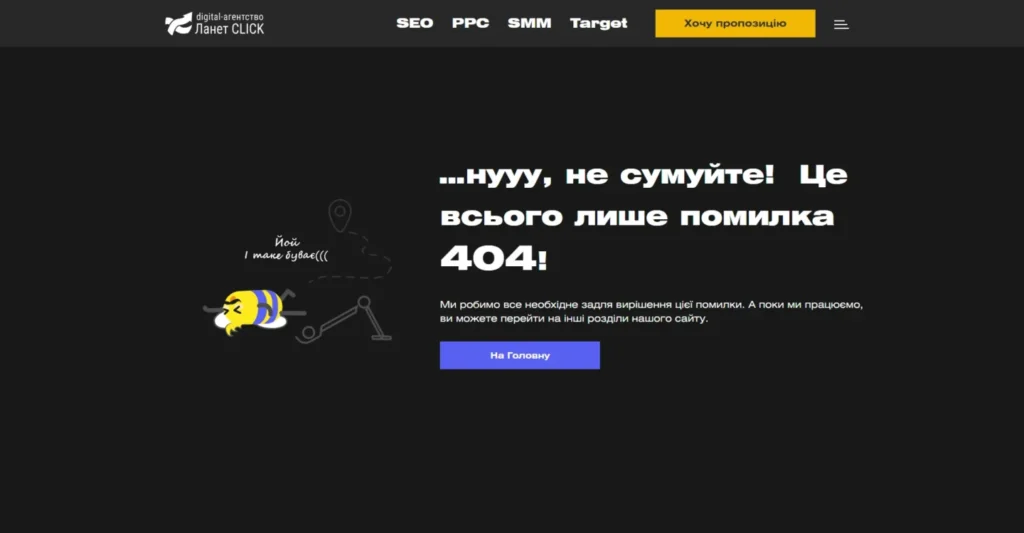
In most cases, users see messages such as 404 Not Found, Page Not Found, or The page could not be found. Instead of displaying a standard error page, many modern websites create custom branded 404 pages with a unique design, a site search feature, navigation menu, or links to popular sections of the website.
A 404 error can be caused by both human mistakes and technical changes to a website. It most commonly occurs after updating the site’s structure, deleting pages, or incorrectly configuring links. If URLs are not checked after making changes, both users and search engine crawlers may end up on pages that no longer exist.
The most common causes of an HTTP 404 status code include:
Most of these issues can be easily avoided by planning website changes in advance, regularly checking that links are working properly, and setting up 301 redirects whenever URLs change. This helps maintain smooth navigation for both users and search engines.

A few pages returning a 404 status code are a natural part of almost any website and usually do not pose a threat to its search rankings. The problem arises when 404 errors become widespread or affect important URLs. In such cases, it is no longer a minor error but one of the technical SEO errors that can affect user behavior, indexing, and the efficiency of search engine crawling.
When users click a link and see a 404 error instead of the page they expected, it creates the impression that the website is broken. Some visitors will simply close the tab, return to the search results, and choose a competitor instead. As a result, the website’s UX may suffer: the bounce rate can increase, time spent on the site may decrease, and users’ trust in the website can decline, especially if such errors occur regularly.
When a page with external or internal links is removed without a 301 redirect, some of the accumulated link equity may be lost. Search engines can no longer pass that value to a new relevant page, causing the website to lose part of its SEO potential. This becomes especially noticeable when a 404 error occurs on a URL that previously had high-quality backlinks or was actively used in internal linking. The website may lose some of the authority it has built over time.
Search engines regularly crawl website pages to discover new and updated content. If crawlers frequently encounter pages with a 404 status code, they may spend part of the crawl budget on URLs that do not provide value. A large number of inaccessible pages can make it more difficult to crawl valuable pages and slow down the process of updating information in search results.
Pages that return a 404 status code are eventually removed from Google’s index after Google confirms that they are no longer available. For content that has been intentionally deleted, this is normal search engine behavior. However, if a 404 error appears on an important category, article, or product page, the website may lose visibility for relevant search queries.
It is important not only to know how to handle a 404 error but also to evaluate it in the context of a specific page. Not every 404 Not Found error negatively affects SEO. If a page has been intentionally removed, no longer provides value to users, and should not be accessible, returning a 404 or 410 status code is the correct approach. In this case, search engines will gradually remove the page from their indexes.
Regular website audits help distinguish natural 404 errors from those that actually interfere with indexing, harm user experience, and require prompt fixes.
To identify pages returning a 404 status code in a timely manner, it is worth checking the website using specialized SEO tools. These tools can quickly detect broken links, assess the scale of the problem, and determine which pages require fixes.
The main ways to find 404 errors on a website include:
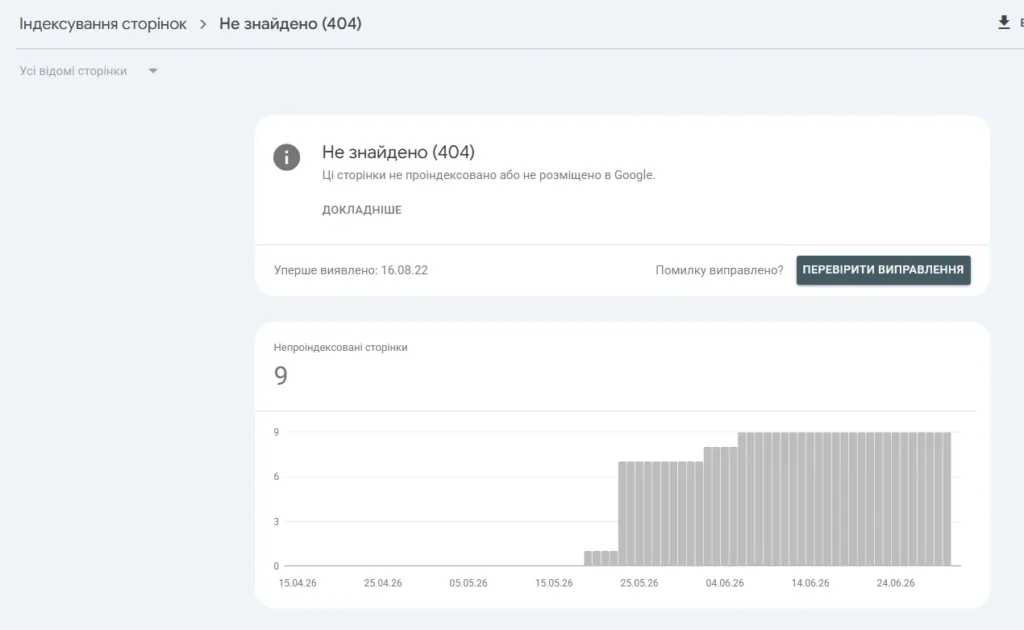
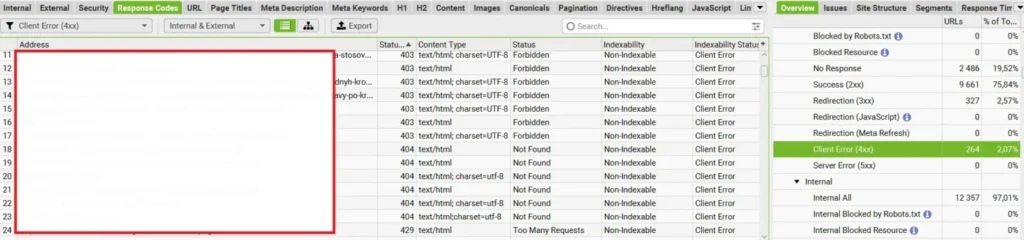
Regular checks and website analytics help maintain proper technical health, quickly resolve errors, and prevent them from accumulating over time.
The way to fix a 404 error always depends on the reason why it occurred. In some cases, it is enough to set up a 301 redirect; in others, you may need to restore the page, fix incorrect links, or update the website’s technical settings. The table below shows how to fix a 404 error in each of the most common situations.
| Cause of 404 error | How to fix it |
| Page deleted without a 301 redirect | If there is a relevant replacement page, set up a 301 redirect. If the content has been permanently removed, the server can return a 404 or 410 status code |
| Page URL changed | Create a 301 redirect from the old URL to the new one and update all internal links |
| Incorrect internal link | Find and fix all broken internal links so they point to existing pages |
| Incorrect external link | If possible, ask the website owner to update the link or set up a redirect to a relevant page |
| Error after website migration | Prepare a redirect map before migration, and after launch, check the website in Google Search Console and SEO crawlers |
| Incorrect CMS or server settings | Check CMS settings, server configuration, redirect rules, and restore damaged system files if necessary |
| Errors in XML Sitemap | Update the XML Sitemap, remove outdated URLs, and resubmit the sitemap in Google Search Console |
| Human error | Check that the URL is correct, restore the page, or set up a redirect |
Preventing 404 errors is much easier than dealing with their consequences. To avoid them, you should:
If you need a comprehensive approach and want to use your marketing budget effectively, consider ordering website promotion from the internet marketing agency Lanet CLICK. The company’s specialists know how to handle 404 errors, help resolve technical issues, and develop an effective SEO strategy, whether you need promotion for a new website or growth for a resource that has been operating for a long time.


CTR helps determine whether ads and organic search results attract the attention of potential customers. But what is CTR in […]

On August 17, 2026, Google updated the bidding logic for campaigns that operate based on target metrics. The goal of […]

What if an advertising campaign could find new customers on its own, create more relevant ads, and optimize its performance? […]
A good strategy, perfectly selected digital tools, and their effective application will allow the business to increase profits, grow the customer base, and form recognition and loyalty. Do you want something like that? Contact us.